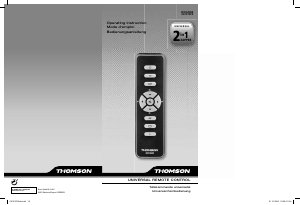
Εγχειρίδιο Thomson ROC1404 Τηλεχειριστήριο

Χρειάζεστε ένα εγχειρίδιο για το Thomson ROC1404 Τηλεχειριστήριο σας; Παρακάτω μπορείτε να δείτε και να κατεβάσετε το εγχειρίδιο PDF δωρεάν στα Αγγλικά. Αυτό το προϊόν έχει αυτήν τη στιγμή 6 συχνές ερωτήσεις, 0 σχόλια και έχει 1 ψήφους με μέση βαθμολογία προϊόντος 100/100. Εάν αυτό δεν είναι το εγχειρίδιο που θέλετε, επικοινωνήστε μαζί μας.

Είναι ελαττωματικό το προϊόν σας και το εγχειρίδιο δεν προσφέρει λύση; Πηγαίνετε σε ένα Repair Café για δωρεάν υπηρεσίες επισκευής.

Εγχειρίδιο

Loading…
GB
1
This universal remote control is compatible with most television sets controlled by infra-red.
This remote control was programmed in the factory, so that you can use it to control most of
the sets of the THOMSON group’s make. For this reason, we recommend that prior to
attempting to programme the remote control, you try it out by means of one of the methods
described in this user manual. However, first of all, you must install 2 batteries (AAA) in the
remote control.
Please keep this guide along with the code list (provided separately), so that you can
subsequently programme your remote control for use with other sets.
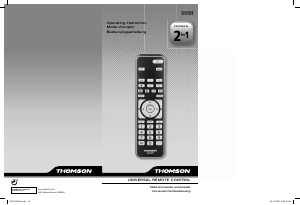
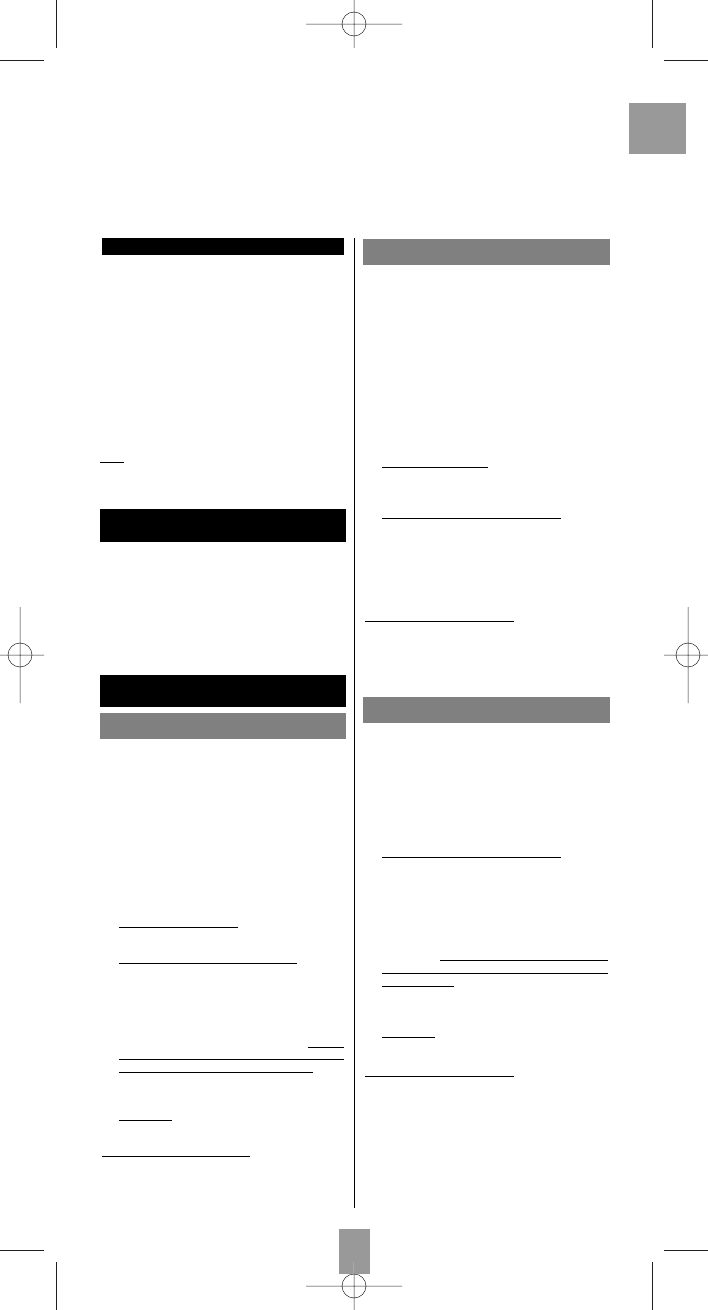
1 Indicator light: the red indicator light is lit whenever
a key is pressed.
2 On/Standby or Standby only, depending on the
equipment being used.
3 Activation and use of teletext (Videotext).
4 Selection of channels, input of digital values,
channels with 2 digits, external TV/VIDEO sources
(AV connectors).
5 Mute.
6 Programming of the remote control.
7 Activation and use of menus (display, deletion,
choice, confirmation).
8 Zapping and volume control.
9 Use of teletext (Fastext) or functions specific to
certain devices.
Note:
depending on the actual devices, manufacturers
and year of manufacture, the functions available will
vary.
The keys
Testing the remote control
before programming
Programming
the remote control
1. Switch on the set you want to control.
2. Direct the remote control towards the TV set and try
to switch it off by simply pressing the key
BB
. If the
device does not turn off, you must program the
remote control using one of the methods A, B, C or
D described hereafter.
Method A – Fast programming
with 1-digit subcode
Method B – 3-digit codes
programming
Before you start programming, you must find the
subcode of the set to be controlled.
Refer to the list provided with these instructions, page I
of the subcodes.
1. Switch on the set you want to control.
2. Hold down the S key until the red indicator light
blinks 3 times and then remains lit (the indicator
light remains on for a few seconds to give you the
time to proceed with the following steps. The
indicator lamp flashes to signal that this time is
almost up, and then goes off).
3. While the indicator is lit
, type in the subcode
(example: 1 for THOMSON).
4. Dir
ect the remote control towards the set and try to
switch it off by pressing the key
BB
.
5. If the set you want to control switches off, press OK
to memorise the subcode.
6. Should the set not switch off, press key
BB
repeatedly, until the set switches off. Between
pressing the keys, be sure to leave enough time for
the indicator light to go out and then relight (about
1 second). Proceeding this way will enable you to
see whether the set responds or not.
7. Immediately
upon the switching-off of the set to be
controlled, press OK to store the subcode.
Check of the pr
ogramming:
In principle, your set is ready for receiving the remote
control commands.
Check your remote control for proper functioning by
performing the test described on page 2.
Before you start programming, you must find the code
of the set to be controlled.
Refer to the list provided with these instructions, page II
of the codes.
1. Switch on the set you want to control.
2. Hold down the S key until the red indicator light
blinks 3 times and then remains lit (the indicator
light remains on for a few seconds to give you the
time to proceed with the following steps. The
indicator lamp flashes to signal that this time is
almost up, and then goes off).
3. While the indicator is lit
, enter the first digit of the
3-digit code proposed for the set to be controlled
(example: 036 for Thomson).
4. Dir
ect the remote control towards the set and try to
switch it off by pressing the key
BB
.
5. Should the set not switch off, repeat step 2. Then
type in the next 3-digit code. Try to switch off the set
by pressing key
BB
once. Repeat this procedure by
trying out each of the 3-digit codes.
Check of the pr
ogramming:
In principle, your set is ready for receiving the remote
control commands.
Check your remote control for proper functioning by
performing the test described on page 2.
Method C – Programming by means
of code retrieval
Should none of the codes work, you still have the
possibility of retrieving the appropriate code without
having to perform any input.
1. Switch on the set you want to control.
2. Hold down the S key until the red indicator light
blinks 3 times and then remains lit.
3. Dir
ect the remote control towards the set and try to
switch it off by pressing the key
BB
.
4. If the set you want to control switches off, press OK
to memorise the subcode.
5. Should the set not switch off, press key
BB
as many
times as required (up to 200 times), until the set
switches off. Between pr
essing the keys, be sure to
leave enough time for the indicator light to go out
and then relight (about 1 second). Proceeding this
way will enable you to see whether the set responds
or not.
6. Immediately
upon the switching-off of the set to be
controlled, press OK to store the code.
Check of the pr
ogramming:
In principle, your set is ready for receiving the remote
control commands.
Check your remote control for proper functioning by
performing the test described on page 2.
Try out other remote control keys to find out the range
of functions you can control. If you think that not all of
the keys are active, repeat the procedure of this
programming method to find out the code supporting a
wider range of features.
F01_GB_ROC1404 9/12/04 17:17 Page 1
Λήψη εγχειριδίου στα ελληνικά (PDF, 1.65 MB)
(Σκεφτείτε το περιβάλλον και εκτυπώστε αυτό το εγχειρίδιο μόνο εάν είναι πραγματικά απαραίτητο)

Loading…

Βαθμολογία

Πείτε μας τη γνώμη σας για το Thomson ROC1404 Τηλεχειριστήριο βαθμολογώντας ένα προϊόν. Θέλετε να μοιραστείτε τις εμπειρίες σας με αυτό το προϊόν ή να θέσετε μια ερώτηση; Αφήστε ένα σχόλιο στο κάτω μέρος της σελίδας.
Είστε ικανοποιημένοι με το Thomson ROC1404 Τηλεχειριστήριο?
Ναι Όχι
100%
0%
1 ψήφος

Λάβετε μέρος στη συζήτηση σχετικά με αυτό το προϊόν

Εδώ μπορείτε να μοιραστείτε τη γνώμη σας για το Thomson ROC1404 Τηλεχειριστήριο. Εάν έχετε κάποια ερώτηση, διαβάστε πρώτα προσεκτικά το εγχειρίδιο. Το να ζητήσετε ένα εγχειρίδιο μπορεί να γίνει χρησιμοποιώντας τη φόρμα επικοινωνίας μας.

Περισσότερα για αυτό το εγχειρίδιο

Κατανοούμε ότι είναι ωραίο να έχετε ένα χάρτινο εγχειρίδιο για το Thomson ROC1404 Τηλεχειριστήριο σας. Μπορείτε πάντα να κατεβάσετε το εγχειρίδιο από τον ιστότοπό μας και να το εκτυπώσετε μόνοι σας. Εάν θέλετε να έχετε ένα πρωτότυπο εγχειρίδιο, σας συνιστούμε να επικοινωνήσετε με το Thomson. Μπορεί να είναι σε θέση να παρέχουν ένα πρωτότυπο εγχειρίδιο. Αναζητάτε το εγχειρίδιο του Thomson ROC1404 Τηλεχειριστήριο σας σε διαφορετική γλώσσα; Επιλέξτε τη γλώσσα που προτιμάτε στην αρχική μας σελίδα και αναζητήστε τον αριθμό μοντέλου για να δείτε αν τον έχουμε διαθέσιμο.

Προδιαγραφές

Μάρκα Thomson
Μοντέλο ROC1404
Κατηγορία Τηλεχειριστήρια
Τύπος αρχείου PDF
Μέγεθος αρχείου 1.65 MB

Όλα τα εγχειρίδια για Thomson Τηλεχειριστήρια
Περισσότερα εγχειρίδια του Τηλεχειριστήρια

Συχνές ερωτήσεις σχετικά με Thomson ROC1404 Τηλεχειριστήριο

Η ομάδα υποστήριξής μας αναζητά χρήσιμες πληροφορίες προϊόντος και απαντήσεις σε συχνές ερωτήσεις. Εάν εντοπίσετε ανακρίβεια στις συνήθεις ερωτήσεις μας, ενημερώστε μας χρησιμοποιώντας τη φόρμα επικοινωνίας.

Πώς μπορώ να συνδέσω ένα τηλεχειριστήριο γενικής χρήσης στην τηλεόρασή μου; Επαληθεύτηκε

Για να συνδέσετε το τηλεχειριστήριο γενικής χρήσης, χρειάζεστε τον αριθμό μοντέλου και το εμπορικό σήμα του τηλεχειριστηρίου και της τηλεόρασης. Υπάρχει μια λίστα κωδικών για μάρκες και αριθμούς μοντέλων στο εγχειρίδιο του τηλεχειριστηρίου.

Αυτό ήταν χρήσιμο (8001) Διαβάστε περισσότερα

Γιατί υπάρχουν γράμματα δίπλα στους αριθμούς στο τηλεχειριστήριο; Επαληθεύτηκε

Ορισμένες ρυθμίσεις τηλεόρασης ενδέχεται να απαιτούν την εισαγωγή γραμμάτων. Υπάρχουν συνήθως τρία γράμματα ή άλλοι χαρακτήρες σε ένα κουμπί. Όταν απαιτείται εισαγωγή γραμμάτων, μπορείτε να πατήσετε αυτό το κουμπί μία φορά για το πρώτο γράμμα, να πατήσετε δύο φορές για το δεύτερο γράμμα και να πιέσετε 3 φορές για το τρίτο γράμμα. Με αυτόν τον τρόπο, το κείμενο μπορεί να γραφτεί με έναν ελάχιστο αριθμό κουμπιών.

Αυτό ήταν χρήσιμο (683) Διαβάστε περισσότερα

Θα λειτουργεί επίσης το τηλεχειριστήριο μου σε άλλα τηλεοπτικά μοντέλα της ίδιας μάρκας; Επαληθεύτηκε

Συχνά, ένα τηλεχειριστήριο μιας τηλεόρασης λειτουργεί επίσης σε παρόμοια μοντέλα της ίδιας μάρκας. Ωστόσο, είναι ασυνήθιστο να λειτουργεί σε όλα τα μοντέλα αυτής της μάρκας. Τα τηλεχειριστήρια γενικής χρήσης είναι πιο κατάλληλα για αυτό.

Αυτό ήταν χρήσιμο (524) Διαβάστε περισσότερα

Ποιο είναι το μέσο εύρος ενός τηλεχειριστηρίου υπερύθρων; Επαληθεύτηκε

Ένα μέσο τηλεχειριστήριο υπερύθρων είχε εύρος περίπου 3 έως 6 μέτρα. Επίσης, όσο πιο μακριά είναι η συσκευή, τόσο πιο δύσκολο θα είναι να στοχεύσετε.

Αυτό ήταν χρήσιμο (412) Διαβάστε περισσότερα

Μια μπαταρία στη συσκευή μου είναι οξειδωμένη, μπορώ να την χρησιμοποιήσω με ασφάλεια; Επαληθεύτηκε

Ωστόσο, η συσκευή μπορεί να χρησιμοποιηθεί με ασφάλεια. Αρχικά, αφαιρέστε την μπαταρία οξειδωτικού. Ποτέ μην χρησιμοποιείτε γυμνά χέρια για να το κάνετε αυτό. Στη συνέχεια, καθαρίστε τη θήκη της μπαταρίας με βαμβακερό στυλεό βουτηγμένο σε ξύδι ή χυμό λεμονιού. Αφήστε το να στεγνώσει και τοποθετήστε νέες μπαταρίες.

Αυτό ήταν χρήσιμο (372) Διαβάστε περισσότερα

Μπορώ να αφήσω μια αντικαταστάσιμη μπαταρία σε μια συσκευή για μεγάλο χρονικό διάστημα; Επαληθεύτηκε

Οι αντικαταστάσιμες μπαταρίες μπορούν να παραμείνουν στη συσκευή για μεγάλο χρονικό διάστημα εάν η συσκευή χρησιμοποιείται. Όταν μια συσκευή αποθηκεύεται για μεγάλο χρονικό διάστημα, συνιστάται να αφαιρέσετε τις μπαταρίες για να αποφύγετε την οξείδωση.

Αυτό ήταν χρήσιμο (271) Διαβάστε περισσότερα
Εγχειρίδιο Thomson ROC1404 Τηλεχειριστήριο

Σχετικά προϊόντα

Σχετικές κατηγορίες

×
Download