ΥΠΟΔΕΙΞΗ:
Ο χρήστης πρέπει να κάνει τακτικά διαλείμματα κατά τη χρήση του
προϊόντος. Σε περίπτωση πόνου στα χέρια, τους βραχίονες ή στην
περιοχή των ώμων και του αυχένα, πρέπει να διακόπτεται η εργασία
και να εκτελούνται μερικές διατατικές ασκήσεις.
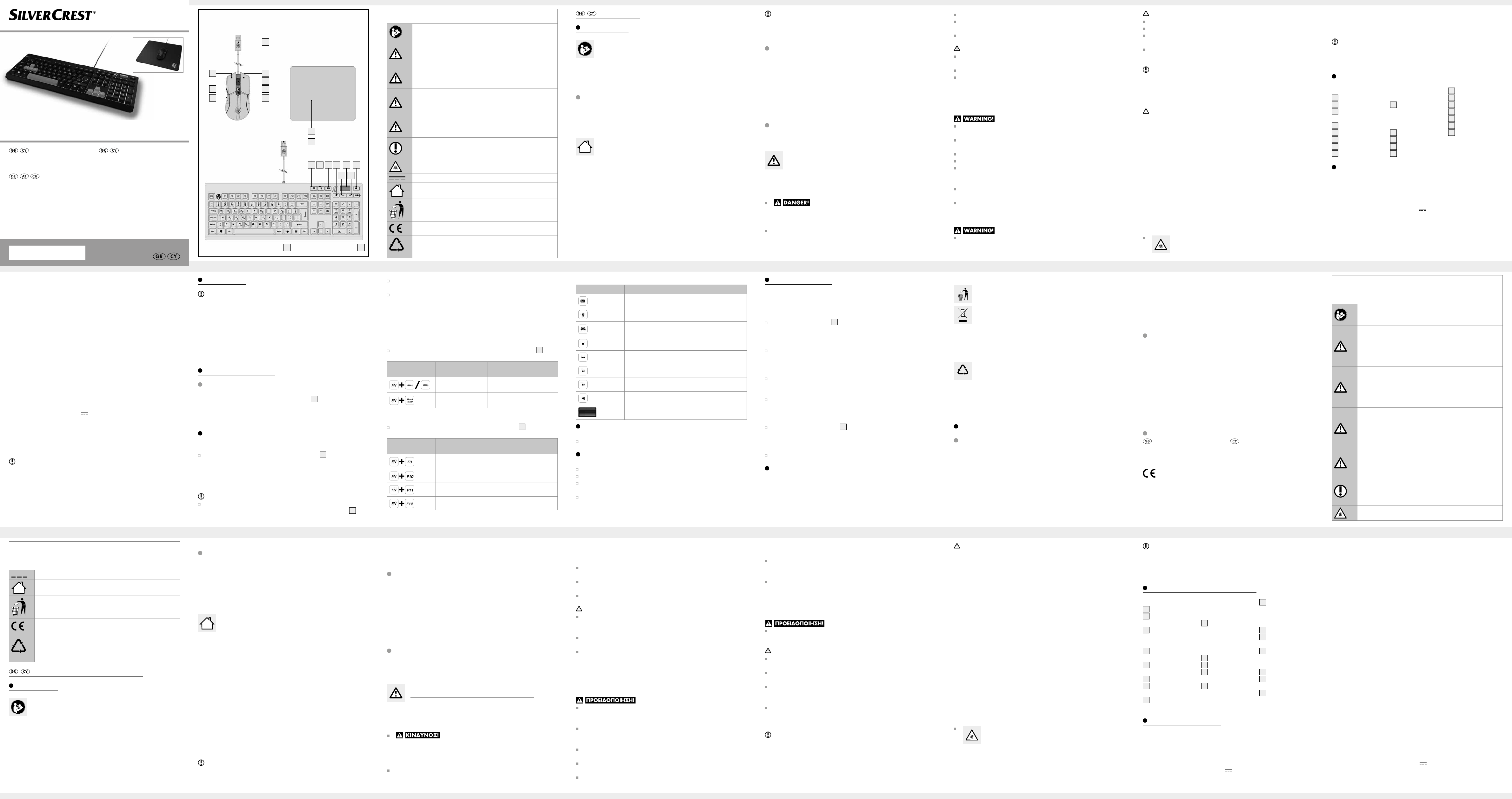
Περιγραφήεξαρτημάτων
Ποντίκιgaming
1
Βύσμα USB τύπου A
2
Δεξί πλήκτρο
ποντικιού
3
Τροχός κύλισης
και μεσαίο πλή-
κτρο ποντικιού
4
Πλήκτρο αύξησης
ευαισθησίας (+)
5
Πλήκτρο μείωσης
ευαισθησίας (-)
6
Πλήκτρο «πίσω»
7
Πλήκτρο
«εμπρός»
8
Αριστερό πλή-
κτρο ποντικιού
Επιφάνειακύλισης
ποντικιού(mouse
pad)gaming
9
Επιφάνεια κύλι-
σης ποντικιού
Πληκτρολόγιο
gaming
10
Βύσμα USB τύπου A
11
Πλήκτρο email
12
Πλήκτρο φωτι-
σμού
13
Πλήκτρο gaming
mode (λειτουρ-
γίας παιχνιδιού)
14
Πλήκτρο διακο-
πής αναπαραγω-
γής
(πολυμέσων)
15
Πλήκτρο «πίσω»
16
Ρύθμιση έντασης
ήχου
17
Πλήκτρο αναπα-
ραγωγής/παύσης
(πολυμέσων)
18
Πλήκτρο σίγασης
19
Πλήκτρο
«εμπρός»
20
Πλήκτρο λειτουρ-
γιών (FN)
Τεχνικάστοιχεία
Λειτουργικά συστήματα: Windows 7 ή νεότερη έκδοση
Mac OS 10.11 ή νεότερη έκδοση
Πληκτρολόγιοgaming
Hardware: 1 ελεύθερη θύρα USB
Τάση εισόδου: 5V
Ρεύμα εισόδου: 200 mA
Μήκος καλωδίου: περ. 2,2 m
Διαστάσεις πληκτρολογίου
(Π x Β x Υ): περ. 450 x 162 x 36 mm
Βάρος (με καλώδιο): περ. 744 g
Θερμοκρασία λειτουργίας: +5 °C έως +45 °C
Υγρασία λειτουργίας: 10 % έως 80 %
σχετική ατμοσφαιρική υγρασία
Θερμοκρασία αποθήκευσης: -20 °C έως +60 °C
Υγρασία αποθήκευσης: 5 % εώς 95 %
σχετική ατμοσφαιρική υγρασία
Επιφάνειακύλισης
ποντικιού(mousepad)
gaming
Διαστάσεις (Π x Β x Υ): περ. 340 x 280 x 3 mm
Βάρος: περ. 186 g
Ποντίκιgaming
Ευαισθησία (DPI): 200, 600, 1200, 2000,
4000, 7200
Φωτισμός: Μπλε
Hardware: 1 ελεύθερη θύρα USB
7 πλήκτρα ελέγχου: αριστερό, δεξί, τροχός κύλισης,
εμπρός, πίσω, ευαισθησία +, ευαι-
σθησία –
Ταχύτητα μεταφοράς
δεδομένων μέσω USB: 500 Hz
Μέγ. επιτάχυνση: 20 G
IPS: 60
Μήκος καλωδίου: περ. 2,2 m
Διαστάσεις (Π x Β x Υ): περ. 64 x 126 x 40 mm
Βάρος (με καλώδιο): περ. 125 g
Τάση εισόδου: 5V
Ρεύμα εισόδου: 200 mA
Θερμοκρασία λειτουργίας: +5 °C έως +45 °C
ΠΡΟΣΟΧΗ!
Βεβαιωθείτε,ότι:
- Το προϊόν δεν εκτίθεται σε έντονο τεχνητό φωτισμό.
- Αποφεύγεται η επαφή με ψεκαζόμενο νερό, σταγόνες και δια-
βρωτικά υγρά και ότι το προϊόν δεν χρησιμοποιείται κοντά σε
νερό. Ειδικότερα, το προϊόν δεν πρέπει ποτέ να βυθίζεται σε
υγρά. Ποτέ μην τοποθετείτε δοχεία, όπως, π.χ., ανθοδοχεία ή
φιάλες ποτών γεμάτα/-ες με υγρά πάνω ή κοντά στο προϊόν.
- Το προϊόν δεν χρησιμοποιείται κοντά σε μαγνητικά πεδία (π.χ.,
ηχεία).
- Δεν εισέρχονται ξένα σώματα στο περίβλημα.
- Το προϊόν σε καμία φάση δεν υπόκειται σε ακραίες θερμοκρασι-
ακές διακυμάνσεις, καθώς από κάτι τέτοιο ενδέχεται να δημιουρ-
γηθεί συμπύκνωμα και να προκληθούν ηλεκτρικά
βραχυκυκλώματα. Εάν, ωστόσο, το προϊόν έχει εκτεθεί σε
ακραίες θερμοκρασιακές διακυμάνσεις, περιμένετε (πέρ. 2
ώρες), μέχρι το προϊόν να φτάσει στη θερμοκρασία του περι-
βάλλοντος πριν το χρησιμοποιήσετε πάλι.
- Το προϊόν σε καμία φάση δεν εκτίθεται σε ακραίες κρούσεις ή
κραδασμούς.
- Τα συνδεδεμένα καλώδια τοποθετούνται πάντα με τέτοιον
τρόπο, ώστε να μην μπορεί κανείς να τα πατήσει ή να σκοντά-
ψει πάνω τους. Υφίσταται κίνδυνος τραυματισμού.
- Δεν τοποθετούνται αντικείμενα πάνω σε καλώδια και ότι τα κα-
λώδια δεν τραβιώνται πάνω από αιχμηρές ακμές, καθώς ειδάλ-
λως μπορεί να πάθουν ζημιά.
Πρέπει να είστε προσεκτικοί, ώστε να αποφεύγετε
τραυματισμούς στα μάτια και το δέρμα, όταν βρίσκεστε
κοντά σε οπτική ακτινοβολία.
- Το καλώδιο τοποθετείται με τέτοιον τρόπο, ώστε να μην πατη-
θεί από κανέναν ή να λυγίσει. Προσέχετε ιδιαίτερα τα βύσματα,
τις θύρες USB και το σημείο, στο οποίο το καλώδιο συνδέεται
με το προϊόν.
καλώδιο και τα βύσματα USB. Μην χρησιμοποιείτε το καλώδιο ή
το βύσμα USB, εάν παρουσιάζει ζημιά.
Η χρησιμοποιούμενη θύρα USB πρέπει να είναι πάντα εύκολα προ-
σβάσιμη, έτσι ώστε το βύσμα USB σε περίπτωση ανάγκης να
μπορεί να τραβηχθεί γρήγορα από τη θύρα USB.
Εάν αντιληφθείτε ασυνήθιστους θορύβους, καπνό ή παρόμοια
συμβάντα, πρέπει να τραβήξετε αμέσως το καλώδιο USB από τη
θύρα USB και να αποσυνδέσετε όλες τις συνδεδεμένες συσκευές.
Ξαναχρησιμοποιήστε το προϊόν μόνον αφού ελεγχθεί από πρό-
σωπο με ανάλογες γνώσεις.
Το προϊόν επιτρέπεται να χρησιμοποιείται μόνο σε στεγνούς εσω-
τερικούς χώρους.
ΠΡΟΣΟΧΗ!ΚΙΝΔΥΝΟΣΥΛΙΚΩΝΖΗΜΙΩΝ!
Το προϊόν αυτό δεν περιλαμβάνει εξαρτήματα που μπορούν να
αντικατασταθούν από τον καταναλωτή.
Μην τοποθετείτε αναμμένα κεριά ή άλλες ανοιχτές φλόγες πάνω
ή κοντά στο προϊόν!
Π ριν από κάθε χρήση, ελέγχετε το προϊόν και τα παρλεκόμενα
για τυχόν ζημιές. Σε καμία περίπτωση μην χρησιμοποιείτε το προ-
ϊόν, εάν παρουσιάζει ζημιά.
Μη λειτουργείτε το προϊόν κοντά σε πηγές θερμότητας, όπως,
π.χ., θερμαντικά σώματα ή άλλες συσκευές που εκπέμπουν θερ-
μότητα!
ΥΠΟΔΕΙΞΗ:
Εάν παρουσιαστούν ηλεκτροστατικές εκκενώσεις στην άμεση περι-
οχή του προϊόντος, το προϊόν ενδέχεται να απενεργοποιηθεί για
λίγο. Εάν ο φωτισμός του προϊόντος ήταν ενεργοποιημένος πριν
από την εκφόρτιση, δεν θα ενεργοποιηθεί ξανά αυτόματα και πρέπει
να επαναρυθμιστεί χειροκίνητα από τον χρήστη.
γνώσης, παρά μόνο υπό την επίβλεψη ή καθοδήγηση ατόμου
υπεύθυνου για την ασφάλειά τους ή εάν έχουν λάβει από εκείνο
οδηγίες για το πώς να χρησιμοποιούν τη συσκευή.
Τα παιδιά πρέπει να επιβλέπονται, ώστε να εξασφαλίζεται, ότι
δεν παίζουν με τη συσκευή.
Ο καθαρισμός και η συντήρηση χρήστη απαγορεύεται να εκτε-
λούνται από παιδιά χωρίς επίβλεψη.
Τα παιδιά πρέπει να επιβλέπονται, όταν χειρίζονται τη συσκευή.
ΚΙΝΔΥΝΟΣ!
ΚΙΝΔΥΝΟΣΘΆΝΆΤΟΣΆΠΟΗΛΕΚΤΡΟΠΛΗΞΙΆ! Κρατάτε
το προ
ϊόν μακριά από υγρασία, χώρους με υγρασία, σταγόνες και
ψεκασμό νερ
ού!
Ποτέ μην ανοίγετε το προϊόν. Υπάρχει κίνδυνος ηλεκτροπληξίας
εάν ανοιχθεί το προϊόν.
Αναθέτετε όλες τις εργασίες επισκευής σε εξειδικευμένο προσω-
πικό. Απαιτείται επισκευή, εάν το προϊόν έχει πάθει ζημιά με
οποιονδήποτε τρόπο. Αυτό ισχύει για παράδειγμα εάν το προϊόν
παρουσιάζει ζημιά, χύθηκε υγρό πάνω του, έπεσαν αντικείμενα
πάνω του, εκτέθηκε στη βροχή ή σε υγρασία, δεν λειτουργεί κα-
νονικά ή έπεσε κάτω.
Κατά την αποσύνδεση από την υποδοχή USB, πάντα πιάνετέ το
για να το τραβήξετε από το βύσμα USB. Μην τραβάτε το καλώ-
διο.
Μην αγγίζετε το βύσμα USB με υγρά και ιδίως όχι με βρεγμένα
χέρια. Ειδάλλως, υπάρχει κίνδυνος βραχυκυκλώματος και ηλε-
κτροπληξίας.
Μην τοποθετείτε έπιπλα ή παρόμοια πάνω στο καλώδιο USB.
Προσέξτε να μην μαγκωθεί το καλώδιο.
Ποτέ μην κάνετε κόμπο στο καλώδιο USB και μην το δένετε κό-
μπο με άλλα καλώδια.
Εάν παρουσιάζει ζημιά, το καλώδιο ή το βύσμα USB μπορεί να
προκαλέσει πυρκαγιά ή ηλεκτροπληξία. Ελέγχετε τακτικά το
2. Όλες οι ειδικές λειτουργίες ή πολλαπλές αντιστοιχίσεις πλή-
κτρων μπορύν να χρησιμοποιηθούν μόνο με τη χρήση του πλή-
κτρου λειτουργίας «Fn».
Υποδείξειςγιατασήματα
- Το USB
®
είναι σήμα κατατεθέν της USB Implementers Forum, Inc.
- Το Windows
®
είναι σήμα κατατεθέν της Microsoft Corporation στις
ΗΠΑ και σε άλλες χώρες.
- Το Mac OS είναι σήμα της Apple Inc., κατατεθέν στις Ηνωμένες
Πολιτείες και σε άλλες χώρες.
- Το σήμα και η εμπορική ονομασία «SilverCrest» αποτελούν ιδιοκτη-
σία των εκάστοτε ιδιοκτητών.
- Όλες οι άλλες ονομασίες και προϊόντα αποτελούν σήματα ή σή-
ματα κατατεθέντα των εκάστοτε ιδιοκτητών τους.
Περιεχόμεναπαράδοσης
1 ποντίκι gaming
1 πληκτρολόγιο gaming
1 επιφάνεια κύλισης ποντικιού
(mouse pad) gaming
1 εγχειρίδιο με οδηγίες χρήσης
Γενικέςυποδείξειςασφαλείας
Πριν από τη χρήση του προϊόντος, πρέπει να εξοικειωθείτε με όλες
τις υποδείξεις ασφαλείας και χρήσης! Εάν μεταβιβάσετε το προϊόν
σε τρίτο, μην ξεχάσετε να παραδώσετε μαζί και αυτά τα έγγραφα!
ΚΙΝΔΥΝΟΣΘΆΝΆΤΟΣΚΆΙΚΙΝΔΥΝΟΣ
ΆΤΥΧΗΜΆΤΟΣΓΙΆΝΗΠΙΆΚΆΙΠΆΙΔΙΆ! ΚΙΝΔΥΝΟΣ
ΆΣΦΥΞΙΆΣ!Τα υλικά συσκευασίας δεν είναι παιδικό παιχνίδι. Τα
παιδιά δεν επιτρέπεται να παίζουν με τα υλικά συσκευασίας. Υφί-
σταται κίνδυνος ασφυξίας.
Αυτή η συσκευή δεν προβλέπεται για χρήση από άτομα (παιδιών
συμπεριλαμβανομένων) με περιορισμένες σωματικές, αισθητηρι-
ακές ή πνευματικές ικανότητες ή με έλλειψη εμπειρίας και/ή
Προβλεπόμενηχρήση
Ποντίκιgaming
Αυτό το ποντίκι gaming RGB (το οποίο παρακάτω θα αναφέρεται ως
«προϊόν») είναι μια συσκευή τεχνολογίας πληροφοριών και έχει σχε-
διαστεί ως συσκευή εισόδου για υπολογιστές. Αυτό το προϊόν δεν
επιτρέπεται να χρησιμοποιείται εκτός κλειστών χώρων. Αυτό το
προΊόν δεν προβλέπεται για χρήση σε επιχειρήσεις ή για άλλους
εμπορικούς σκοπούς (π.χ., εφαρμογές γραφείου).
Χρησιμοποιείτε αυτό το προϊόν για οικιακή χρήση και ιδιω-
τικούς σκοπούς.
Οποιαδήποτε άλλη χρήση θεωρείται μη ενδεδειγμένη. Αξιώσεις που
οφείλονται σε μη ενδεδειγμένη χρήση ή σε μη εξουσιοδοτημένες
τροποποιήσεις του προϊόντος δεν καλύπτονται από την εγγύηση. Μια
τέτοια χρήση γίνεται με δική σας ευθύνη.
Πληκτρολόγιοgaming
Αυτό το πληκτρολόγιο gaming (το οποίο παρακάτω θα αναφέρεται
ως «προϊόν») είναι μια συσκευή τεχνολογίας πληροφοριών. Αυτό το
προϊόν περοβλέπεται για χρήση ως συσκευή εισόδου, με σύνδεσή
του στη θύρα USB ενός υπολογιοστή. Αυτό το προϊόν επιτρέπεται να
χρησιμοποιείται μόνο για ιδιωτική χρήση και όχι για βιομηχανικούς ή
εμπορικούς σκοπούς. Ακόμη, το προϊόν δεν επιτρέπεται να χρησιμο-
ποιείται στις τροπικές κλιματικές ζώνες. Οποιαδήποτε άλλη χρήση
θεωρείται μη ενδεδειγμένη. Αξιώσεις που οφείλονται σε μη ενδεδειγ-
μένη χρήση ή σε μη εξουσιοδοτημένες τροποποιήσεις του προϊόντος
δεν καλύπτονται από την εγγύηση. Μια τέτοια χρήση γίνεται με δική
σας ευθύνη.
ΥΠΟΔΕΙΞΗ:
1. Οι διατάξεις πληκτρολογίου ενδέχεται να αποκλίνουν ανάλογα με
τον τόπο.
Χρησιμοποιούμενεςπροειδοποιητικέςυποδείξειςκαι
σύμβολα
Σε αυτές τις οδηγίες χρήσης χρησιμοποιούνται τα ακόλουθα σύμ-
βολα και προειδοποιητικές υποδείξεις:
Συνεχές ρεύμα
Χρησιμοποιείτε το προϊόν μόνο σε στεγνούς εσωτερικούς
χώρους.
Αυτό το σύμβολο υπενθυμίζει ότι η συσκευασία πρέπει
να απορρίπτεται με τρόπο φιλικό προς το περιβάλλον.
Με τη σήμανση CE, η snakebyte Distribution GmbH δη-
λώνει τη συμμόρφωση με τους κανονισμούς ΕΕ.
21
PAP
Με το σύμβολο της ανακύκλωσης (3 βέλη) επισημαίνο-
νται τα ανακυκλώσιμα υλικά. Το υλικό μπορεί να προσδι-
οριστεί με τον κωδικό ανακύκλωσης στο κέντρο (εδώ:
21) και/ή με μια συντομογραφία (εδώ: PAP).
Σετπληκτρολόγιοgaming
Εισαγωγή
Σας συγχαίρουμε για την αγορά του νέου σας προϊόντος.
Επιλέξατε ένα προϊόν υψηλών προδιαγραφών. Οι οδηγίες
χρήσης είναι μέρος αυτού του προϊόντος. Περιέχουν σημα-
ντικές πληροφορίες σχετικά με την ασφάλεια, το χειρισμό και την
απόρριψη. Πριν τη χρήση του προϊόντος εξοικειωθείτε με όλες τις
οδηγίες χρήσης και ασφαλείας. Χρησιμοποιείτε το προϊόν μόνο με τον
τρόπο που περιγράφεται και για τον τομέα εφαρμογής που αναφέρε-
ται. Σε περίπτωση μεταβίβασης του προϊόντος σε τρίτους παραδώστε
μαζί και όλα τα έγγραφα.
Product:
Contact your local waste disposal authority for more details on how
to dispose of your worn-out product.
This product is subject to the European guideline 2012/19/EU. The
symbol of the wheelie bin with a line through it means that, in the
European Union, the product has to be disposed of in a separate
refuse collection. This applies to the product and to all components bearing
this symbol. Do not dispose of products bearing this symbol in your normal
household waste, but instead take them for recycling at a collection site for
electrical and electronic appliances.
21
PAP
This recycling symbol indicates e.g. an object or material parts for
material recovery. Recycling helps to reduce the consumption of raw
materials and protects the environment. For information on disposal
and the location of the nearest recycling centre, please contact e.g. your muni
cipal
waste management or refer to the yellow pages.
This disposal is free of charge to you.
Protect the environment and dispose of the product properly.
Warranty and service
Warranty
The product has been manufactured to strict quality guidelines and meticulously
examined before delivery. In the event of product defects you have legal rights
against the retailer of this product. Your legal rights are not limited in any way
by our warranty detailed below.
The warranty for this product is 3 years from the d
ate of purchase. The warranty
period begins on the date of purchase. Please keep the original sales receipt in
a safe location. This document is required as your proof of purchase.
Should this product show any fault in materials or manufacture within 3 years
from the date of purchase, we will repair or replace it – at our choice – free of
Troubleshooting
This product is not working properly:
Gaming mouse
Option 1:
Ensure the USB connector
1
is plugged into the USB port correctly and
the computer is on, or try a different USB port.
Option 2:
The product may not work or work correctly on glass or mirrored surfaces.
In this case the user will need to use a suitable mouse pad.
Option 3:
Uninstall the software and restart the computer. Reinstall the software.
Option 4:
If the mouse if malfunctioning, the user may need to clean the optical sensor.
Gaming keyboard
Option 1:
Make sure the USB connector
10
is plugged into the USB port correctly
and the computer is on. If necessary, try a different USB port.
Option 2:
Plug the USB connector into the USB port again.
Disposal
Packaging:
The packaging is made from environmentally-friendly materials which can be
disposed of through your local recycling facilities.
Special keys
Key Function
Opens the default email program
Enables/disables LED light effects
Locks the Win key to not switch between Windows
and APPS
Stop track
Go to previous track
Play/pause track
Play next track
Mutes audio output
Raises and lowers the audio volume
Storage when not in use
Store the product in a dry location, protected from dust and direct sunlight.
Cleaning
Only clean the housing of the product with a soft, dry cloth!
For tough dirt, you may use a mild cleaning agent.
Only clean the product with a clean, dry cloth, never use corrosive fluids.
Use a slightly dampened cloth and a mild cleaner to remove tough dirt.
Carefully moisten a soft, lint free cloth with glass cleaner and gently wipe
down the product.
For more details on special functions which are different from a standard
keyboard, see section “Function keys” and “Special keys”.
The keys in the top right corner are reserved for special functions. They can
be used as indicated by the symbols to control program functions directly,
such as playing media. The key assignment may differ slightly depending on
the operating system. Please note, depending on the version of the operating
system, some standard and special keys may not be suitable for the specified
function, e.g. Windows key.
Keyboard shortcuts
To access special functions, press and hold the function key “Fn”
20
and
the desired key.
Keyboard
shortcuts
Function Description
Lighting brightness
settings
2
0 %, 40 %, 60 %, 80 %, 1
00 %
Change lighting mode
Change light mode to on/pulse
Function keys
To use these functions, simultaneously press the “Fn” key
20
and the
desired key.
Keyboard
shortcuts
Function
Opens the default web browser and loads the
homepage
Opens the calculator
Opens “Computer”
Opens “Windows Search”
Before use
NOTE:
- All parts must be unpacked and all packaging materials removed.
- Verify the package contents are complete and undamaged before use!
- Please contact the retailer where the product was purchased if parts are
missing or damaged.
Gaming mouse pad
1. Remove the mouse pad from the packaging.
2. Place the mouse pad on a flat, sturdy surface.
3. Place your gaming mouse in the middle of the mouse pad.
Operation and use
Prior to first use
Gaming mouse
Turn on your computer and plug the USB connector
1
for the mouse into a
open USB port on your computer. The computer will recognise your gaming
mouse and automatically install any necessary standard drivers. The mouse is
now ready to use and can initially be used as a standard computer mouse.
General functions
Gaming keyboard
Turn on your computer and plug the USB connector
10
for the keyboard
into any open USB port on your computer. The computer will detect your
gaming keyboard and automatically install any necessary standard drivers.
The keyboard is now ready to use and can initially be used as a standard
computer keyboard.
NOTE:
The keyboard has all functions of a regular standard keyboard. The special
functions and settings can be accessed with the function key “Fn”
20
.
Storage temperature: -20 °C to +60 °C
Storage humidity: 5 % to 95 % relative humidity
Gaming mouse pad
Dimensions (W x D x H): approx. 340 x 280 x 3 mm
Weight: approx. 186 g
Gaming mouse
Resolution (DPI): 200, 600, 1200, 2000, 4000, 7200
Backlight: blue
Hardware: 1 open USB port
7 control buttons: left, right, scroll wheel, next, back, resolution +,
resolution –
USB transfer rate: 500 Hz
Max. acceleration: 20 G
IPS: 60
Cable length: approx. 2.2 m
Dimensions (W x D x H): approx. 64 x 126 x 40 mm
Weight (with cable): approx. 125 g
Input voltage: 5 V
Input current: 200 mA
Operating temperature: +5 °C to +45 °C
Operating humidity: 10 % to 80 % relative humidity
Storage temperature: -20 °C to +60 °C
Storage humidity: 5 % to 95 % relative humidity
NOTE:
Specifications and design subject to change without notice. Subject to technical
changes without notice.
snakebyte Distribution GmbH hereby declares that this product complies with
the basic requirements and applicable provisions of ROHS 2011/65/EU.
For the full EU Declaration of Conformity, please contact snakebyte Distribution
GmbH, see Service.
charge to you. This warranty becomes void if the product has been damaged,
or used or maintained improperly.
The warranty applies to defects in material or manufacture. This warranty does
not cover product parts subject to normal wear, thus possibly considered consum-
ables (e.g. batteries) or for damage to fragile parts, e.g. switches, rechargeable
batteries or glass parts.
Warranty claim procedure
To ensure quick processing of your case, please observe the following instructions:
Please have the till receipt and the item number (IAN 386519_2110) available
as proof of purchase.
You will find the item number on the rating plate, an engraving on the front page
of the instructions for use (bottom left), or as a sticker on the rear or bottom of
the product.
If functional or other defects occur, please contact the service department listed
either by telephone or by e-mail.
You can return a defective product to us free of charge to the service address
that will be provided to you. Ensure that you enclose the proof of purchase
(till receipt) and information about what the defect is and when it occurred.
Service
Service Great Britain
Tel.: +44 800 096 4781
(freephone)
E-Mail: lidl@snakebyte.support
Service Cyprus
Tel.: +357 80 077093
(χωρίς χρέωση)
E-Mail: lidl@snakebyte.support
ATTENTION! RISK OF PROPERTY DAMAGE!
This product has no parts which can be replaced by the user.
Do not set burning candles or other open flames on or near the product!
Check the product and accessories for damage before every use. Never
use the product if damaged.
Do not operate the product near heat sources, e.g. radiators or other
devices which emit heat!
NOTE:
If electrostatic discharges occur in the immediate vicinity of the product, the
product may switch off briefly. If the lighting of the product was switched on
before the discharge, it will not switch on again automatically and must be re-
set manually by the user.
ATTENTION!
Be sure:
- the product is not exposed to strong artificial light.
- to avoid any contact with splashing or dripping water and corrosive fluids,
and not to operate the product near water, and especially never to immerse
the product in liquids; never place containers with liquids, e.g. vases or
beverages, on or near the product.
- not to use the product near magnetic fields (e.g. speakers).
- foreign objects do not enter the housing.
- the product is never exposed to extreme temperature fluctuations, which
could cause condensation and electric short-circuits. If the product is ex-
posed to extreme temperature fluctuations, wait (approx. 2 hours) for the
product to reach ambient temperature before continuing use.
- never to expose the product to extreme shocks or vibrations.
- to always run the connected cables so they will not be stepped on or
tripped over. There is a risk of injury.
- not to set objects on a cable and that the cables are not pulled across
sharp edges to prevent damage.
Be careful to prevent injuries to the eyes and skin near optical
radiation.
Children must be supervised to ensure they do not play with the device.
Do not allow children to clean the product or perform user maintenance
without supervision.
Children must be supervised when using this device.
DANGER!
DANGER TO LIFE FROM ELECTRIC SHOCK! Keep the product
away from moisture, damp areas, dripping water and splashing water!
Never open the product. Opening the product poses a risk of electric shock.
Seek professional help for any repairs. Repairs are required if the product
is damaged in any way. For instance, if the product is damaged, liquids
have been spilled on the product, objects have fallen into the product, the
product has been exposed to rain or moisture, or it is not working correctly,
or has been dropped.
Always grab the USB connector directly when unplugging from the USB
port. Do not pull on the cable.
Do not touch the USB connector with moist or wet hands. Risk of short-cir-
cuits or electric shock.
Do not set furniture, etc. on the USB cable. Be sure not to crush the cable.
Never tie knots in the USB cable or tie it together with other cables.
A damaged USB cable or USB connector can cause a fire or electric shock.
Routinely check the USB cable and USB connectors. Do not use a damaged
USB cable or USB connector.
The USB port used must always be easily accessible to ensure the USB
connector can quickly be unplugged from the USB port in an emergency.
If you notice unusual noise, smoke, etc., immediately unplug the USB cable
from the USB port and disconnect all connected devices. Do not use the
product again until it has been checked by a qualified person.
Only use the product in dry indoor locations.
NOTE:
1. Regional keyboard layouts may vary.
2. Any special functions or multiple programming can only be used with the
function key “Fn”.
Brand notices
- USB
®
is a registered trademark of USB Implementers Forum, Inc.
- Windows
®
is a registered trademark of Microsoft Corporation in the USA and
other countries.
- Mac OS is a trademark of Apple Inc., registered in the United States and
other countries.
- The brand and the trade name “SilverCrest” are property of the respective
owners.
- All other names and products are brands or registered trademarks of their
respective owners.
Scope of delivery
1 gaming mouse
1 gaming keyboard
1 gaming mouse pad
1 set of instructions for use
General safety instructions
Please familiarise yourself with all safety instructions and instructions for use be-
fore using the product! Include this documentation when passing this product on
to third parties!
DANGER TO LIFE AND RISK OF ACCI-
DENTS FOR INFANTS AND CHILDREN! RISK OF SUFFO-
CATION! The packaging material is not a toy. Do not allow children to
play with the packaging material. There is a risk of suffocation.
Persons (including children) who lack the knowledge or experience to use
the device or whose physical, sensory or intellectual capacities are limited
must never be allowed to use the device without supervision or instruction
by a person responsible for their safety.
Gaming set
Introduction
We congratulate you on the purchase of your new product. You have
chosen a high quality product. The instructions for use are part of the
product. They contain important information concerning safety, use
and disposal. Before using the product, please familiarise yourself with all of the
safety information and instructions for use. Only use the product as described
and for the specified applications. If you pass the product on to anyone else,
please ensure that you also pass on all the documentation with it.
Intended use
Gaming mouse
This gaming mouse (hereinafter referred to as “product”) is an information
technology device and designed for computer input. Never use this product
outside of enclosed spaces. This product is not intended for use in companies
or other commercial purposes (e.g. office use).
Use this product for at-home use and private purposes.
Any other use is considered improper. Claims due to improper use or unauthor-
ised product modifications are not covered by the warranty. Any such use is at
your own risk.
Gaming keyboard
This gaming keyboard (hereinafter referred to as “product”) is an information
technology device. This product is intended as an input device to connect to the
USB port on a computer. This product may only be used for private purposes,
not for industrial or commercial purposes. Furthermore, this product must not be
used in tropical climate zones. Any other use is considered improper. Claims due
to improper use or unauthorised product modifications are not covered by the
warranty. Any such use is at your own risk.
Warnings and symbols used
The following warnings and symbols are used in these instructions for use:
This symbol means read the instructions for use before using this
product.
DANGER!
This symbol along with the signal word “DANGER” indicates
a life-threatening situation which may cause fatal injuries unless
averted.
WARNING!
This symbol along with the signal word “WARNING” indicates a
d
angerous situation which may cause serious injuries unless av
erted.
CAUTION!
This symbol, along with the signal word “CAUTION”, indicates
a low-risk danger which could cause minor to moderate injuries
unless avoided.
ATTENTION!
This symbol along with the signal word “ATTENTION” indicates
potential property damage unless averted.
NOTE
This symbol along with the signal word “Note” provides
additional helpful information.
Optical radiation warning
Direct current
Only use the product in dry indoor areas.
This symbol is a reminder to dispose of the packaging in an
environmentally friendly manner.
snakebyte Distribution GmbH uses the CE marking to indicate
EU conformity.
21
PAP
The recycling symbol (3 arrows) indicates recyclable materials.
The material can be specified by the recycling number in the
middle (in this case: 21) and/or abbreviations (in this case: PAP).
GAMING SET
IAN 386519_2110
GAMING SET
Operation and safety notes
ΣΕΤΠΛΗΚΤΡΟΛΟΓΙΟGAMING
Υποδείξεις χειρισμού και ασφαλείας
GAMING-SET
Bedienungs- und Sicherheitshinweise
7
1
2
3
4
5
8
6
10
11
9
20
12 13 14 16 18
15 17
19
- to run the cable so it will not be stepped on or crushed or kinked. Pay
special attention to connectors, USB ports and the point where the cable
is connected to the product.
NOTE:
The user must take regular breaks when using the product. Stop working and
perform some stretches if you feel pain in the hands, arms or shoulder and
neck region.
Parts description
Gaming mouse
1
USB type A connector
2
Right mouse button
3
Scroll wheel and
centre mouse button
4
Resolution +button
5
Resolution –button
6
Back button
7
Next button
8
Left mouse button
Gaming mouse
pad
9
Mouse pad
Gaming key-
board
10
USB type A connector
11
Email key
12
Backlight key
13
Game mode key
14
Stop key
15
Back key
16
Volume adjustment
17
Play/pause key
18
Mute key
19
Next key
20
Function key (FN)
Technical data
Operating systems: Windows 7 or higher
Mac OS 10.11 or higher
Gaming keyboard
Hardware: 1 open USB port
Input voltage: 5 V
Input current: 200 mA
Cable length: approx. 2.2 m
Keyboard dimensions (W x D x H): approx. 450 x 162 x 36 mm
Weight (with cable): approx. 744 g
Operating temperature: +5 °C to +45 °C
Operating humidity: 10 % to 80 % relative humidity
Χρησιμοποιούμενεςπροειδοποιητικέςυποδείξειςκαι
σύμβολα
Σε αυτές τις οδηγίες χρήσης χρησιμοποιούνται τα ακόλουθα σύμ-
βολα και προειδοποιητικές υποδείξεις:
Αυτό το σύμβολο σημαίνει ότι πριν από τη χρήση του
προϊόντος πρέπει να λαμβάνονται υπόψη οι οδηγίες χρή-
σης.
ΚΙΝΔΥΝΟΣ!
Αυτό το σύμβολο, σε συνδυασμό με την προειδοποιη-
τική λέξη «ΚΙΝΔΥΝΟΣ», δηλώνει μια κατάσταση απειλη-
τική για τη ζωή, η οποία ενδέχεται να προκαλέσει
θανάσιμους τραυματισμούς εάν δεν ληφθεί υπόψη η
υπόδειξη για κίνδυνο.
ΠΡΟΕΙΔΟΠΟΙΗΣΗ!
Αυτό το σύμβολο, σε συνδυασμό με την προειδοποιη-
τική λέξη «ΠΡΟΕΙΔΟΠΟΙΗΣΗ», δηλώνει μια επικίνδυνη
κατάσταση, η οποία ενδέχεται να προκαλέσει σοβαρούς
τραυματισμούς, εάν δεν ληφθεί υπόψη η υπόδειξη για
κίνδυνο.
ΠΡΟΦΥΛΆΞΗ!
Αυτό το σύμβολο, σε συνδυασμό με την προειδοποιη-
τική λέξη «ΠΡΟΦΥΛΑΞΗ», δηλώνει μια κατάσταση με
χαμηλό βαθμό επικινδυνότητας, η οποία ενδέχεται να
προκαλέσει ελαφρούς ή μέτριους τραυματισμούς εάν
δεν ληφθεί υπόψη η υπόδειξη για κίνδυνο.
ΠΡΟΣΟΧΗ!
Αυτό το σύμβολο με την προειδοποιητική λέξη «ΠΡΟ-
ΣΟΧΗ» υποδηλώνει πιθανή υλική ζημιά σε περίπτωση
μη παράλειψης.
ΥΠΟΔΕΙΞΗ
Αυτό το σύμβολο με την προειδοποιητική λέξη «ΥΠΟ-
ΔΕΙΞΗ» προσφέρει παρέχει περαιτέρω χρήσιμες πληρο-
φορίες.
Προειδοποίηση για οπτική ακτινοβολία


Λάβετε μέρος στη συζήτηση σχετικά με αυτό το προϊόν
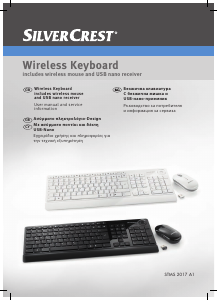
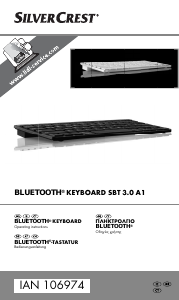
Εδώ μπορείτε να μοιραστείτε τη γνώμη σας για το SilverCrest IAN 386519 Πληκτρολόγιο. Εάν έχετε κάποια ερώτηση, διαβάστε πρώτα προσεκτικά το εγχειρίδιο. Το να ζητήσετε ένα εγχειρίδιο μπορεί να γίνει χρησιμοποιώντας τη φόρμα επικοινωνίας μας.