Εγχειρίδιο Salter 9063 WH3R Dashboard Goal Tracker Ζυγαριά

Χρειάζεστε ένα εγχειρίδιο για το Salter 9063 WH3R Dashboard Goal Tracker Ζυγαριά σας; Παρακάτω μπορείτε να δείτε και να κατεβάσετε το εγχειρίδιο PDF δωρεάν στα Αγγλικά. Αυτό το προϊόν έχει αυτήν τη στιγμή 4 συχνές ερωτήσεις, 0 σχόλια και 0 ψήφους. Εάν αυτό δεν είναι το εγχειρίδιο που θέλετε, επικοινωνήστε μαζί μας.

Είναι ελαττωματικό το προϊόν σας και το εγχειρίδιο δεν προσφέρει λύση; Πηγαίνετε σε ένα Repair Café για δωρεάν υπηρεσίες επισκευής.

Εγχειρίδιο

Loading…
2
GB
HOW DOES THIS SALTER SCALE WORK?
This Salter scale allows eective weight management through Goal Tracking.
This scale stores the personal data of up to 8 users. As well as Goal Tracking this
scale can be used as a conventional scale.
NEW FEATURE!
This scale features our convenient step-on operation. Once initialised the scale can
be operated by simply stepping straight on the platform – no more waiting!
PREPARING YOUR SCALE
1. Open the battery compartment on the scale underside.
2. Insert batteries (4 x AAA) observing the polarity signs (+ and -) inside the battery
compartment.
3. Close the battery compartment.
4. Select kg, st or lb weight mode by the switch on the underside of the scale.
5. For use on carpet remove the non-slip pads from the scales feet and attach
enclosed carpet feet.
6. Position scale on a firm flat surface.
INITIALISING YOUR SCALE
1. Press the platform centre and remove your foot.
2. 0.0’ will be displayed.
3. The scale will switch o and is now ready for use.
This initialisation process must be repeated if the scale is moved.
At all other times step straight on the scale.
WEIGHT READING ONLY
1. Step on and stand very still while the scale computes your weight.
2. Your weight is displayed.
3. Step o. Your weight will be displayed for a few seconds.
4. The scale will switch o.
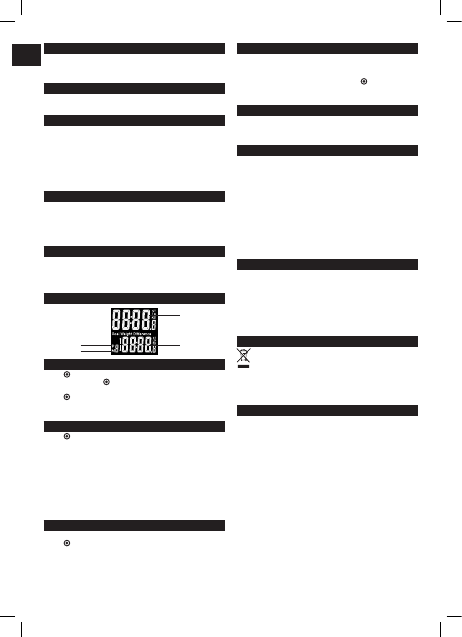
DISPLAY GUIDE
SET GOAL WEIGHT
1. Press button. User number will flash. Press
s
or
t
as necessary to select
your user number, press to confirm.
2. Goal Weight will flash. Press
s
or
t
as necessary to set your goal weight,
press to confirm.
3. Your goal weight is set and then the scale will turn o.
4. Repeat the procedure for a second user, or to change user details.
WEIGHING WITH GOAL TRACKER
1. Press button. User number will flash. Press
s
or
t
as necessary to select
your user number.
2. Wait until 0.0 is displayed.
3. Step on and stand very still while the scale computes your weight.
4. Your Weight is displayed for a few seconds followed by Goal Weight and Goal
Weight Dierence.
Note: The Goal Weight Dierence is shown as follows:
#
A up arrow shows weight above goal weight.
$
A down arrow shows weight below goal weight.
If no Goal Weight is set ---- will be displayed. To set Goal Weight see SET GOAL
WEIGHT section above.
WEIGHT HISTORY RECALL
The scale can store the last 4 results for each user. To view the results history:
1. Press button. User number will flash. Press
s
or
t
as necessary to select
your user number.
2. Wait until 0.0 is displayed.
3. Press and hold unit switch for 3 seconds to enter recall mode.
4. M1, Weight and Goal Weight Dierence will be displayed.
5. Press
s
or
t
to view M1-M4.
Note: If a memory location has no record ---- will be displayed.
RESET MEMORY
1. Follow steps 1-3 above to enter WEIGHT HISTORY RECALL.
2. Press and hold
s
and
t
together for 3 seconds to enter reset mode.
3. RE:SET will be displayed.
4. Press
s
or
t
as necessary to select YES or NO. Press to confirm.
5. If YES selected scale shows ---- then will turn o.
6. If NO selected scale turns o.
WARNING INDICATORS
Err Unstable weight. Stand still.
O-Ld Weight exceeds maximum capacity.
Lo Replace battery.
ADVICE FOR USE AND CARE
Always weigh yourself on the same scale placed on the same floor surface.
Do not compare weight readings from one scale to another as some
dierences will exist due to manufacturing tolerances.
Placing your scale on a hard, even floor will ensure the greatest accuracy and
repeatability.
Weigh yourself at the same time each day, before meals and without footwear.
First thing in the morning is a good time.
Your scale rounds up or down to the nearest increment. If you weigh yourself
twice and get two dierent readings, your weight lies between the two.
Clean your scale with a damp cloth. Do not use chemical cleaning agents.
Do not allow your scale to become saturated with water as this can damage
the electronics.
Treat your scale with care - it is a precision instrument. Do not drop it or jump on it.
TROUBLESHOOTING GUIDE
If you experience any diculty in the use of your scale:
Check the battery is correctly fitted.
Check that you have selected your preference of stones/pounds, kilograms or
pounds.
Check that the scale is on a flat, level floor and not touching against a wall.
If when you use the scale there is no display at all or if ‘Lo’ is displayed - try a
new battery.
If ‘O-Ld’ is displayed the scale has been overloaded.
WEEE EXPLANATION
This marking indicates that this product should not be disposed with other
household wastes throughout the EU. To prevent possible harm to the
environment or human health from uncontrolled waste disposal, recycle it
responsibly to promote the sustainable reuse of material resources. To return your
used device, please use the return and collection systems or contact the retailer
where the product was purchased. They can take this product for environmental
safe recycling.
GUARANTEE
This product is intended for domestic use only. Salter will repair or replace the
product, or any part of this product, (excluding batteries) free of charge if within
15 years of the date of purchase, it can be shown to have failed through defective
workmanship or materials. This guarantee covers working parts that aect the
function of the scale. It does not cover cosmetic deterioration caused by fair wear
and tear or damage caused by accident or misuse. Opening or taking apart the
scale or its components will void the guarantee. Claims under guarantee must be
supported by proof of purchase and be returned carriage paid to Salter (or local
Salter appointed agent if outside the UK). Care should be taken in packing the
scale so that it is not damaged while in transit. This undertaking is in addition to a
consumer’s statutory rights and does not aect those rights in any way.
For UK Sales and Service contact HoMedics Group Ltd, PO Box 460, Tonbridge, Kent,
TN9 9EW, UK. Helpline Tel No: (01732) 360783. Outside the UK contact your local
Salter appointed agent.
Weight
User number
Memory position
Goal weight/
Goal weight dierence
Λήψη εγχειριδίου στα ελληνικά (PDF, 3.09 MB)
(Σκεφτείτε το περιβάλλον και εκτυπώστε αυτό το εγχειρίδιο μόνο εάν είναι πραγματικά απαραίτητο)

Loading…

Βαθμολογία

Πείτε μας τη γνώμη σας για το Salter 9063 WH3R Dashboard Goal Tracker Ζυγαριά βαθμολογώντας ένα προϊόν. Θέλετε να μοιραστείτε τις εμπειρίες σας με αυτό το προϊόν ή να θέσετε μια ερώτηση; Αφήστε ένα σχόλιο στο κάτω μέρος της σελίδας.
Είστε ικανοποιημένοι με το Salter 9063 WH3R Dashboard Goal Tracker Ζυγαριά?
Ναι Όχι
Γίνε ο πρώτος που θα βαθμολογήσει αυτό το προϊόν
0 ψήφοι

Λάβετε μέρος στη συζήτηση σχετικά με αυτό το προϊόν

Εδώ μπορείτε να μοιραστείτε τη γνώμη σας για το Salter 9063 WH3R Dashboard Goal Tracker Ζυγαριά. Εάν έχετε κάποια ερώτηση, διαβάστε πρώτα προσεκτικά το εγχειρίδιο. Το να ζητήσετε ένα εγχειρίδιο μπορεί να γίνει χρησιμοποιώντας τη φόρμα επικοινωνίας μας.

Περισσότερα για αυτό το εγχειρίδιο

Κατανοούμε ότι είναι ωραίο να έχετε ένα χάρτινο εγχειρίδιο για το Salter 9063 WH3R Dashboard Goal Tracker Ζυγαριά σας. Μπορείτε πάντα να κατεβάσετε το εγχειρίδιο από τον ιστότοπό μας και να το εκτυπώσετε μόνοι σας. Εάν θέλετε να έχετε ένα πρωτότυπο εγχειρίδιο, σας συνιστούμε να επικοινωνήσετε με το Salter. Μπορεί να είναι σε θέση να παρέχουν ένα πρωτότυπο εγχειρίδιο. Αναζητάτε το εγχειρίδιο του Salter 9063 WH3R Dashboard Goal Tracker Ζυγαριά σας σε διαφορετική γλώσσα; Επιλέξτε τη γλώσσα που προτιμάτε στην αρχική μας σελίδα και αναζητήστε τον αριθμό μοντέλου για να δείτε αν τον έχουμε διαθέσιμο.

Προδιαγραφές

Μάρκα Salter
Μοντέλο 9063 WH3R Dashboard Goal Tracker
Κατηγορία Ζυγαριές
Τύπος αρχείου PDF
Μέγεθος αρχείου 3.09 MB

Όλα τα εγχειρίδια για Salter Ζυγαριές
Περισσότερα εγχειρίδια του Ζυγαριές

Συχνές ερωτήσεις σχετικά με Salter 9063 WH3R Dashboard Goal Tracker Ζυγαριά

Η ομάδα υποστήριξής μας αναζητά χρήσιμες πληροφορίες προϊόντος και απαντήσεις σε συχνές ερωτήσεις. Εάν εντοπίσετε ανακρίβεια στις συνήθεις ερωτήσεις μας, ενημερώστε μας χρησιμοποιώντας τη φόρμα επικοινωνίας.

Η κλίμακα μου δείχνει ένα ρεαλιστικά χαμηλό βάρος όταν το στέκομαι, γιατί είναι αυτό; Επαληθεύτηκε

Για το καλύτερο αποτέλεσμα, η ζυγαριά πρέπει να στέκεται σε σκληρή επιφάνεια. Όταν η ζυγαριά παραμένει για παράδειγμα ένα χαλί, αυτό μπορεί να επηρεάσει τη μέτρηση.

Αυτό ήταν χρήσιμο (2734) Διαβάστε περισσότερα

Τι είναι ο ΔΜΣ; Επαληθεύτηκε

Ο ΔΜΣ σημαίνει Δείκτης Μάζας Σώματος και μπορεί να υπολογιστεί διαιρώντας το βάρος σας σε χιλιόγραμμα με το μήκος σας σε τετραγωνικά μέτρα. Για παράδειγμα, κάποιος με βάρος 70 κιλά και μήκος 1,75 μέτρα έχει ΔΜΣ 22,86. Ο ΔΜΣ μεταξύ 18,5 και 25 θεωρείται υγιής.

Αυτό ήταν χρήσιμο (1881) Διαβάστε περισσότερα

Μια μπαταρία στη συσκευή μου είναι οξειδωμένη, μπορώ να την χρησιμοποιήσω με ασφάλεια; Επαληθεύτηκε

Ωστόσο, η συσκευή μπορεί να χρησιμοποιηθεί με ασφάλεια. Αρχικά, αφαιρέστε την μπαταρία οξειδωτικού. Ποτέ μην χρησιμοποιείτε γυμνά χέρια για να το κάνετε αυτό. Στη συνέχεια, καθαρίστε τη θήκη της μπαταρίας με βαμβακερό στυλεό βουτηγμένο σε ξύδι ή χυμό λεμονιού. Αφήστε το να στεγνώσει και τοποθετήστε νέες μπαταρίες.

Αυτό ήταν χρήσιμο (865) Διαβάστε περισσότερα

Μπορώ να χρησιμοποιήσω μια ζυγαριά με βρεγμένα πόδια; Επαληθεύτηκε

Αυτό εξαρτάται από την κλίμακα. Όταν χρησιμοποιείτε μια διαγνωστική κλίμακα, είναι απαραίτητο τα πόδια σας να είναι στεγνά για να εκτελέσετε σωστά τις μετρήσεις.

Αυτό ήταν χρήσιμο (570) Διαβάστε περισσότερα
Εγχειρίδιο Salter 9063 WH3R Dashboard Goal Tracker Ζυγαριά

Σχετικά προϊόντα

Σχετικές κατηγορίες

×
Download