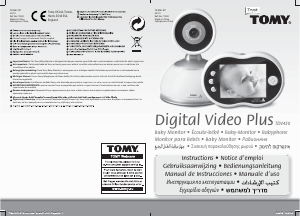
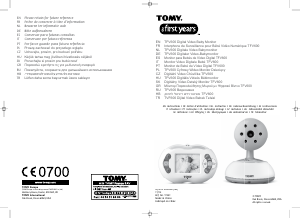
Εγχειρίδιο TOMY SRV400 Digital Video Ενδοεπικοινωνία μωρού

Χρειάζεστε ένα εγχειρίδιο για το TOMY SRV400 Digital Video Ενδοεπικοινωνία μωρού σας; Παρακάτω μπορείτε να δείτε και να κατεβάσετε το εγχειρίδιο PDF δωρεάν στα Αγγλικά. Αυτό το προϊόν έχει αυτήν τη στιγμή 2 συχνές ερωτήσεις, 1 σχόλιο και 0 ψήφους. Εάν αυτό δεν είναι το εγχειρίδιο που θέλετε, επικοινωνήστε μαζί μας.

Είναι ελαττωματικό το προϊόν σας και το εγχειρίδιο δεν προσφέρει λύση; Πηγαίνετε σε ένα Repair Café για δωρεάν υπηρεσίες επισκευής.

Εγχειρίδιο

Loading…
GB GB
4 5
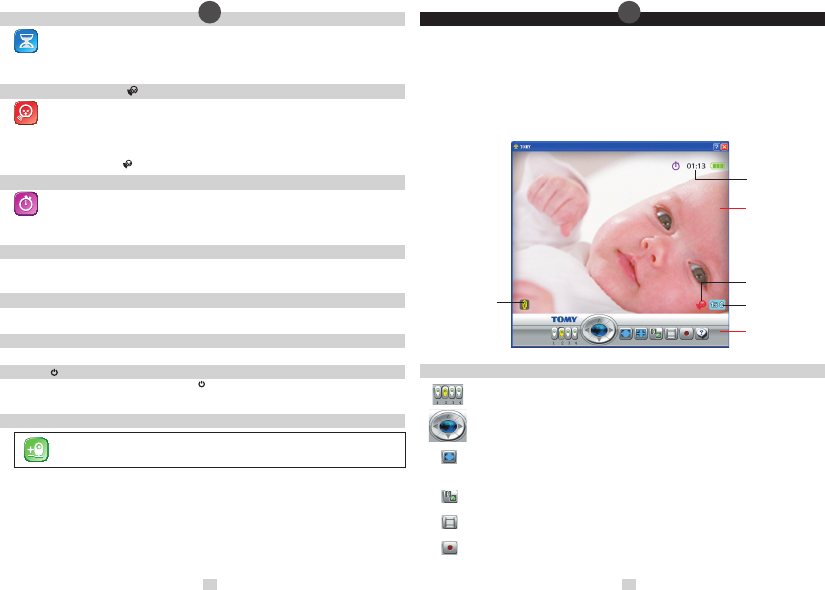
VIEWING AREA
CONTROL AREA
Sound Activated
Monitoring
Temperature
Indicator
Timer Display
Active Baby Unit
Indicator
POWER SAVING MODE
To conserve battery life, your monitor has a power saving feature that will automatically make the video screen
go blank and transmit sounds only if no buttons have been pressed on the Parent Unit for 5 minutes (you can
change this interval to 60 or 30 seconds if you prefer). To reactivate the screen at any time, press the Quick View
Key on top of the Parent Unit.
To disable Power Saving mode and ensure constant video monitoring, connect the Parent Unit to the mains or a PC.
• SOUND ACTIVATED MONITORING
For those quiet moments or when your baby is a little older, you may not want to hear every sound in your
baby’s room. Your Baby Monitor has a Sound Activated Monitoring mode, a feature that only captures sounds
above a pre-set threshold, for example a cry rather than a gurgle.
When Sound Activated Monitoring is selected from the Main Menu, the Parent Unit (and its video display) will go into
sleep mode 10 seconds after your baby settles. Every time your baby’s sounds rise above the threshold, this feature
will be interrupted instantly and normal sound and video monitoring will continue until your baby settles again. The
Sound Activated Monitoring Icon
will show on the Parent Unit’s LCD Display.
• TIMER
Use the Timer on the Parent Unit’s LCD Display to keep track of the interval between feeds, doses of medication,
how long your child has been asleep and so on. Select the Timer from the Main Menu and then select the Start
and Stop icons when ready, using the Navigation Keys and the Mode/Enter Key. For the rst minute, the Timer
will count in seconds. After that, it will count in minutes. To check the Timer when Sound Activated Monitoring
is on or when in Power Saving Mode, simply press the Quick View Key.
• SOUND LEVEL LIGHTS DISPLAY
The Sound Level Lights Display on your Parent Unit reacts to the sounds of your baby. The louder your baby, the more
lights illuminate on the display. You can lower the volume of the Parent Unit while still watching out for baby, ideal for
when you’re relaxing or entertaining.
• QUICK VIEW
Press the Quick View Key on top of the Parent Unit whenever you want to reactivate the video on the LCD Display. If you
are using more than one Baby Unit, you can toggle between pictures by pressing the Quick View Key repeatedly.
• ZOOM
Press the Navigation Key’s up and down arrows on the Parent Unit to zoom in and out.
• PAGING
Locate a lost Parent Unit by pressing the ON/OFF Button
on the Baby Unit 3 times in quick succession and the Parent
Unit will sound a 3-minute long alarm. To silence the alarm, press any button on the Parent Unit. Please note that the
paging feature will only work when both units are switched ON and monitoring as normal.
• USING MULTIPLE BABY UNITS
You can add up to 3 additional Baby Units and monitor their audio and video, all from one
and the same Parent Unit. Additional Baby Units with instructions on pairing up and using
them are available from www.tomy.eu
• PC CONNECTION
You can connect the Parent Unit to your Personal Computer (PC) to monitor your baby, or to record
and replay video. Start by downloading and installing the Tomy PC Viewer software from our website:
www.tomy.co.uk/srmonitors
Once installed, open the Tomy PC Viewer programme and, using the USB cable supplied, connect the Parent Unit to
your PC. Video monitoring will divert to your PC’s screen. Sound monitoring will continue through the Parent Unit.
Its LCD screen will go into standby but all alarm functions will continue as normal.
Your PC should have one of the following Operating Systems: Windows XP (Service Pack 3), Windows Vista
(Service Pack 2) or Windows 7, with the following recommended system requirements: 2.8 GHz dual core
processor or faster; 2 GB of RAM; 10GB of available disk space; 65k colour or higher display card and
support DirectX 9.
• CONTROL AREA BUTTONS
Baby Unit selector – Use your PC’s cursor to select the Baby Unit to be displayed on screen.
Zoom / Pan control – Click repeatedly on the blue button to zoom in (normal size —> X2 —> X3 —> X4 —>
normal size...). Use the arrow buttons around the outside to pan around the picture.
Full screen Click once to enlarge the picture to full screen with the Control Area showing at the bottom
of the screen. Press again to make the Control Area disappear. Press your PC’s Esc key to return to small
screen without the Control Area panel and again to restore to its default setting.
Viewing Area icons on/off – Press repeatedly to show or hide the on-screen icons.
View video library – Click to select and playback pictures in your video library (see below).
Record –
Click to start recording. Pictures will be stored in your video library (see below). Click again to stop recording.
Λήψη εγχειριδίου στα ελληνικά (PDF, 7.94 MB)
(Σκεφτείτε το περιβάλλον και εκτυπώστε αυτό το εγχειρίδιο μόνο εάν είναι πραγματικά απαραίτητο)

Loading…

Βαθμολογία

Πείτε μας τη γνώμη σας για το TOMY SRV400 Digital Video Ενδοεπικοινωνία μωρού βαθμολογώντας ένα προϊόν. Θέλετε να μοιραστείτε τις εμπειρίες σας με αυτό το προϊόν ή να θέσετε μια ερώτηση; Αφήστε ένα σχόλιο στο κάτω μέρος της σελίδας.
Είστε ικανοποιημένοι με το TOMY SRV400 Digital Video Ενδοεπικοινωνία μωρού?
Ναι Όχι
Γίνε ο πρώτος που θα βαθμολογήσει αυτό το προϊόν
0 ψήφοι

Λάβετε μέρος στη συζήτηση σχετικά με αυτό το προϊόν

Εδώ μπορείτε να μοιραστείτε τη γνώμη σας για το TOMY SRV400 Digital Video Ενδοεπικοινωνία μωρού. Εάν έχετε κάποια ερώτηση, διαβάστε πρώτα προσεκτικά το εγχειρίδιο. Το να ζητήσετε ένα εγχειρίδιο μπορεί να γίνει χρησιμοποιώντας τη φόρμα επικοινωνίας μας.

Enjay 24-08-2019
Πώς μπορώ να αυξήσω το εύρος του SRV400 μου; Προς το παρόν πρέπει να βρίσκομαι δίπλα στην κάμερα .. Πριν προλάβω να πάρω ρεσεψιόν περίπου 10 μέτρα μακριά

απάντηση | Αυτό ήταν χρήσιμο (0) (Μεταφράστηκε από την Google)

Περισσότερα για αυτό το εγχειρίδιο

Κατανοούμε ότι είναι ωραίο να έχετε ένα χάρτινο εγχειρίδιο για το TOMY SRV400 Digital Video Ενδοεπικοινωνία μωρού σας. Μπορείτε πάντα να κατεβάσετε το εγχειρίδιο από τον ιστότοπό μας και να το εκτυπώσετε μόνοι σας. Εάν θέλετε να έχετε ένα πρωτότυπο εγχειρίδιο, σας συνιστούμε να επικοινωνήσετε με το TOMY. Μπορεί να είναι σε θέση να παρέχουν ένα πρωτότυπο εγχειρίδιο. Αναζητάτε το εγχειρίδιο του TOMY SRV400 Digital Video Ενδοεπικοινωνία μωρού σας σε διαφορετική γλώσσα; Επιλέξτε τη γλώσσα που προτιμάτε στην αρχική μας σελίδα και αναζητήστε τον αριθμό μοντέλου για να δείτε αν τον έχουμε διαθέσιμο.

Προδιαγραφές

Μάρκα TOMY
Μοντέλο SRV400 Digital Video
Κατηγορία Ενδοεπικοινωνίες μωρού
Τύπος αρχείου PDF
Μέγεθος αρχείου 7.94 MB

Όλα τα εγχειρίδια για TOMY Ενδοεπικοινωνίες μωρού
Περισσότερα εγχειρίδια του Ενδοεπικοινωνίες μωρού

Συχνές ερωτήσεις σχετικά με TOMY SRV400 Digital Video Ενδοεπικοινωνία μωρού

Η ομάδα υποστήριξής μας αναζητά χρήσιμες πληροφορίες προϊόντος και απαντήσεις σε συχνές ερωτήσεις. Εάν εντοπίσετε ανακρίβεια στις συνήθεις ερωτήσεις μας, ενημερώστε μας χρησιμοποιώντας τη φόρμα επικοινωνίας.

Γιατί το εύρος του συστήματος ενδοεπικοινωνίας του μωρού μου είναι μικρότερο από αυτό που περιγράφει το φυλλάδιο/εγχειρίδιο; Επαληθεύτηκε

Οι μάρκες τείνουν να δηλώνουν ένα εύρος που βασίζεται στη χρήση χωρίς εμπόδια όπως οι τοίχοι ή μια απόσταση που καλύπτει πολλούς ορόφους. Εάν το εύρος δεν είναι επαρκές, προσπαθήστε να τοποθετήσετε την οθόνη μωρού έτσι ώστε να έχει ελάχιστα εμπόδια.

Αυτό ήταν χρήσιμο (685) Διαβάστε περισσότερα

Όταν ακούω το μωρό μου, ακούω καθαρά την αναπνοή, αλλά η οθόνη του μωρού δεν με αφήνει να το ακούσω. Γιατί αυτό? Επαληθεύτηκε

Αυτό οφείλεται στην ευαισθησία της οθόνης μωρού. Προσαρμόστε τις ρυθμίσεις ώστε να είναι πιο ευαίσθητες και να λαμβάνετε πιο ήσυχους ήχους.

Αυτό ήταν χρήσιμο (374) Διαβάστε περισσότερα
Εγχειρίδιο TOMY SRV400 Digital Video Ενδοεπικοινωνία μωρού

Σχετικά προϊόντα

Σχετικές κατηγορίες

×
Download