Εγχειρίδιο Clarion CZ202EG Ραδιόφωνο αυτοκινήτου

Χρειάζεστε ένα εγχειρίδιο για το Clarion CZ202EG Ραδιόφωνο αυτοκινήτου σας; Παρακάτω μπορείτε να δείτε και να κατεβάσετε το εγχειρίδιο PDF δωρεάν στα Αγγλικά. Αυτό το προϊόν έχει αυτήν τη στιγμή 4 συχνές ερωτήσεις, 0 σχόλια και 0 ψήφους. Εάν αυτό δεν είναι το εγχειρίδιο που θέλετε, επικοινωνήστε μαζί μας.

Είναι ελαττωματικό το προϊόν σας και το εγχειρίδιο δεν προσφέρει λύση; Πηγαίνετε σε ένα Repair Café για δωρεάν υπηρεσίες επισκευής.

Εγχειρίδιο

Loading…
English
8
CZ202E/CZ202ER/CZ202EG
CD/MP3/WMA Operations
Selecting a track
Track-up
1. Press the [
] button to move ahead to
the beginning of the next track.
2. Each time you press the [
] button, the
track advances ahead to the beginning of the
next track.
3. For MP3/WMA disc, press and hold the [6]
button (1 sec.) to move ahead to +10 tracks.
Track-down
1. Press the [
] button to move back to the
beginning of the current track.
2. Press the [
] button twice to move back
to the beginning of the previous track.
3. For MP3/WMA disc, press and hold the [5]
button (1 sec.) to move back to -10 tracks.
Fast-forward/Fast-reverse
Fast-forward
Press and hold the [
] button .
Fast-reverse
Press and hold the [
] button .
* For MP3/WMA discs, it takes some time until
the start of searching and between tracks. In
addition, some error may occur in the play time.
Folder Select
This function allows you to select a folder
containing MP3/WMA les and start playing from
the rst track in the folder.
1. Press the [ 5 ] or [ 6 ] button.
Press the [ 6 ] button to move the next folder.
Press the [ 5 ] button to move the previous
folder.
2.
To select a track, press the [ ] or [ ]
button.
Search Function
1. Press the [MENU] button to enter FOLD
SCH mode. Press the [VOLUME] button to
enter the folder list search mode.
2. Turn the [VOLUME] knob to select a folder.
3. Press the [VOLUME] button to enter the le
list search mode. And then the track list
appears in the display.
4. Turn the [VOLUME] knob to select a track.
5. Press the [VOLUME] knob to play.
* When play back MP3 / WMA file, this
function is performed in the current
folder.
Top function
The top function resets the CD player to the
rst track of the disc. Press and hold the [ 4 ]

1) on the disc.
* In case of MP3/WMA, the rst track of
the current folder will be played.
Other various play functions
Scan play
This function allows you to locate and
play the first 10 seconds of all the tracks
recorded on a disc.
Press the [ 1 ] button to perform scan play.
Repeat play
This function allows you to play the current
track repeatedly or play a track currently
being played in the MP3/WMA folder
repeatedly.
CD:
1. Press the [ 2 ] button once or more
until RPT ONappears on the LCD to
perform repeat play.
2. Press [ 2 ] button repeatedly until RPT
OFF appears on the LCD to cancel
repeat playback.
MP3/WMA:
1. Press the [ 2 ] button once or more until
TRACK RPT appears on the display to
perform repeat play, and RPT” segment
lights on.
2. For MP3/WMA files, press [ 2 ] button
repea t e d l y un t i l FOLDE R RP T
appears on the display for folder repeat
play.
3. Press [ 2 ] button repeatedly until “RPT
OFFappears on the display to cancel
RPTsegment

Random play
This function allows you to play all tracks
recorded on a disc in a random order.
Press the [ 3 ] button to perform random
play.
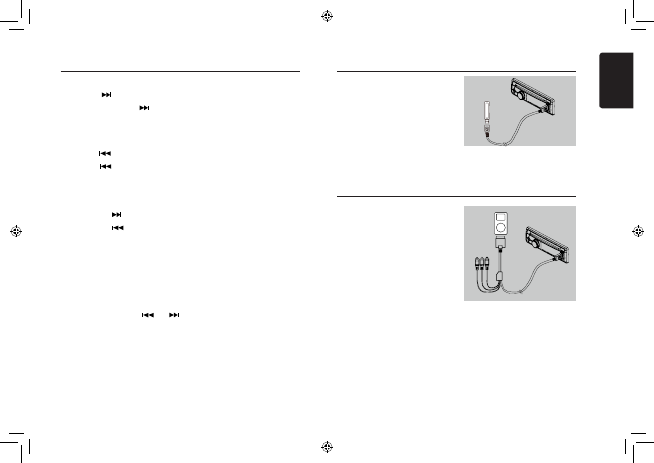
1. Open the cover of the USB connector to the
right. Insert a USB cable (CCA-755) into the
USB connector. Insert a USB device into
the USB cable.
When connecting a USB device, the unit
will read the les automatically.
2. To remove the USB device, you should rst
select another source or turn off the power,
in order to avoid damaging the USB device.
Then take off the USB device. Open the
cover to the left.
3. Operation is same as MP3/WMA operation.
USB Operations
iPod & iPhone Operations
Connect
Connect an iPod or iPhone to the USB
connector via CCA-748 cable.
When connecting a device, the unit will read
the files automatically. The track information
display on the screen once playback start.
MENU
In the S-CTRL OFF mode, press [MENU]
button,rotate the [VOLUME] knob select
MUSIC” or “VIDEO”.
Select MUSIC”, press the [VOLUME] knob,
then rotate the [VOLUME] knob to show PLAY
LISTS / ARTISTS / ALBUMS / GENRES /
SONGS / COMPOSERS, press and rotate the
[VOLUME] knob to select a desired option,
then press the [VOLUME] knob to conrm.
Select VIDEO”, press the [VOLUME] knob,
then rotate the [VOLUME] knob to show
MOVIES / MUSIC VIDEO / TV SHOWS/
VIDEO PODCASTS / RENTALS, press and
rotate the [VOLUME] knob to select a desired
option, then press the [VOLUME] knob to
conrm.
NOTE:
VIDEO MENU item is different by the model
of connected iPod and language setting.
Repeat play
This function allows you to play the current
track repeatedly or play all tracks in your
iPod/iPhone repeatedly.
1. Press the [ 2 ] button once or more until
RPT ONappears on the LCD to perform
repeat play.
2. Press [ 2 ] button repeatedly until RPT
OFF” appears on the LCD to cancel repeat
playback.
to monitor
CCA-755
CCA-748
Λήψη εγχειριδίου στα ελληνικά (PDF, 5.5 MB)
(Σκεφτείτε το περιβάλλον και εκτυπώστε αυτό το εγχειρίδιο μόνο εάν είναι πραγματικά απαραίτητο)

Loading…

Βαθμολογία

Πείτε μας τη γνώμη σας για το Clarion CZ202EG Ραδιόφωνο αυτοκινήτου βαθμολογώντας ένα προϊόν. Θέλετε να μοιραστείτε τις εμπειρίες σας με αυτό το προϊόν ή να θέσετε μια ερώτηση; Αφήστε ένα σχόλιο στο κάτω μέρος της σελίδας.
Είστε ικανοποιημένοι με το Clarion CZ202EG Ραδιόφωνο αυτοκινήτου?
Ναι Όχι
Γίνε ο πρώτος που θα βαθμολογήσει αυτό το προϊόν
0 ψήφοι

Λάβετε μέρος στη συζήτηση σχετικά με αυτό το προϊόν

Εδώ μπορείτε να μοιραστείτε τη γνώμη σας για το Clarion CZ202EG Ραδιόφωνο αυτοκινήτου. Εάν έχετε κάποια ερώτηση, διαβάστε πρώτα προσεκτικά το εγχειρίδιο. Το να ζητήσετε ένα εγχειρίδιο μπορεί να γίνει χρησιμοποιώντας τη φόρμα επικοινωνίας μας.

Περισσότερα για αυτό το εγχειρίδιο

Κατανοούμε ότι είναι ωραίο να έχετε ένα χάρτινο εγχειρίδιο για το Clarion CZ202EG Ραδιόφωνο αυτοκινήτου σας. Μπορείτε πάντα να κατεβάσετε το εγχειρίδιο από τον ιστότοπό μας και να το εκτυπώσετε μόνοι σας. Εάν θέλετε να έχετε ένα πρωτότυπο εγχειρίδιο, σας συνιστούμε να επικοινωνήσετε με το Clarion. Μπορεί να είναι σε θέση να παρέχουν ένα πρωτότυπο εγχειρίδιο. Αναζητάτε το εγχειρίδιο του Clarion CZ202EG Ραδιόφωνο αυτοκινήτου σας σε διαφορετική γλώσσα; Επιλέξτε τη γλώσσα που προτιμάτε στην αρχική μας σελίδα και αναζητήστε τον αριθμό μοντέλου για να δείτε αν τον έχουμε διαθέσιμο.

Προδιαγραφές

Μάρκα Clarion
Μοντέλο CZ202EG
Κατηγορία Ραδιόφωνα αυτοκινήτου
Τύπος αρχείου PDF
Μέγεθος αρχείου 5.5 MB

Όλα τα εγχειρίδια για Clarion Ραδιόφωνα αυτοκινήτου
Περισσότερα εγχειρίδια του Ραδιόφωνα αυτοκινήτου

Συχνές ερωτήσεις σχετικά με Clarion CZ202EG Ραδιόφωνο αυτοκινήτου

Η ομάδα υποστήριξής μας αναζητά χρήσιμες πληροφορίες προϊόντος και απαντήσεις σε συχνές ερωτήσεις. Εάν εντοπίσετε ανακρίβεια στις συνήθεις ερωτήσεις μας, ενημερώστε μας χρησιμοποιώντας τη φόρμα επικοινωνίας.

Τι είναι το DAB +; Επαληθεύτηκε

Το DAB + είναι ο διάδοχος του σήματος FM και σημαίνει Digital Audio Broadcasting. Είναι ένα ψηφιακό σήμα που επιτρέπει περισσότερα κανάλια εντός του ίδιου εύρους ζώνης και επιτρέπει ευκολότερη εναλλαγή μεταξύ καναλιών.

Αυτό ήταν χρήσιμο (642) Διαβάστε περισσότερα

Ποια είναι η διαφορά μεταξύ FM και AM; Επαληθεύτηκε

Τα FM και AM είναι και οι δύο μορφές διαμόρφωσης που χρησιμοποιούνται για τη μετάδοση ενός σήματος. Το FM σημαίνει διαμόρφωση συχνότητας και το AM σημαίνει διαμόρφωση πλάτους. Το AM είναι η παλαιότερη μορφή διαμόρφωσης. Η μεγαλύτερη διαφορά είναι ότι το σήμα FM είναι πολύ ισχυρότερο από το σήμα AM.

Αυτό ήταν χρήσιμο (413) Διαβάστε περισσότερα

Υπάρχει ένα CD στο ραδιόφωνο του αυτοκινήτου μου, τι πρέπει να κάνω; Επαληθεύτηκε

Ορισμένα ραδιόφωνα αυτοκινήτου έχουν τη δυνατότητα να εξάγουν κολλημένα CD. Απενεργοποιήστε το αυτοκίνητο και πατήστε ταυτόχρονα το κουμπί "on" και "eject" για 10 δευτερόλεπτα. Εάν αυτό δεν λειτουργεί, ξεκινήστε το αυτοκίνητο και δοκιμάστε ξανά.

Αυτό ήταν χρήσιμο (395) Διαβάστε περισσότερα

Τι μέγεθος ραδιόφωνο αυτοκινήτου ταιριάζει στο αυτοκίνητό μου; Επαληθεύτηκε

Υπάρχουν δύο τυπικά μεγέθη ραδιοφώνου αυτοκινήτου, 1-DIN και 2-DIN. Το 1-DIN είναι το τυπικό slim versin και το 2-DIN είναι διπλάσιο από αυτό το ύψος. Τα ραδιόφωνα αυτοκινήτου 2-DIN έχουν συχνά χώρο για μια οθόνη για προβολή πληροφοριών πλοήγησης ή αναπαραγωγή ταινιών.

Αυτό ήταν χρήσιμο (332) Διαβάστε περισσότερα
Εγχειρίδιο Clarion CZ202EG Ραδιόφωνο αυτοκινήτου

Σχετικά προϊόντα

Σχετικές κατηγορίες

×
Download